Simple and Advanced Studio
The Gradio Studio is an MVP interface over the same package API. Simple and
Advanced are two views of one canonical recipe and one selection history. The
Studio code, console command, and reviewed Guided Sample are packaged in the
base wheel; the demo extra adds the Gradio runtime needed to launch them.
python -m pip install "aisketcher[demo]==0.4.0"
aisketcher init  # First run only; omit when settings already exist.
aisketcher studio
Use aisketcher studio --config /path/to/aisketcher.yaml for one explicit
project override, or --language en|ko for a session language override. The
normal configuration order is documented in the
configuration reference.
For development, python -m examples.studio_app.app remains a thin compatibility
entry point over the packaged app in an editable checkout.
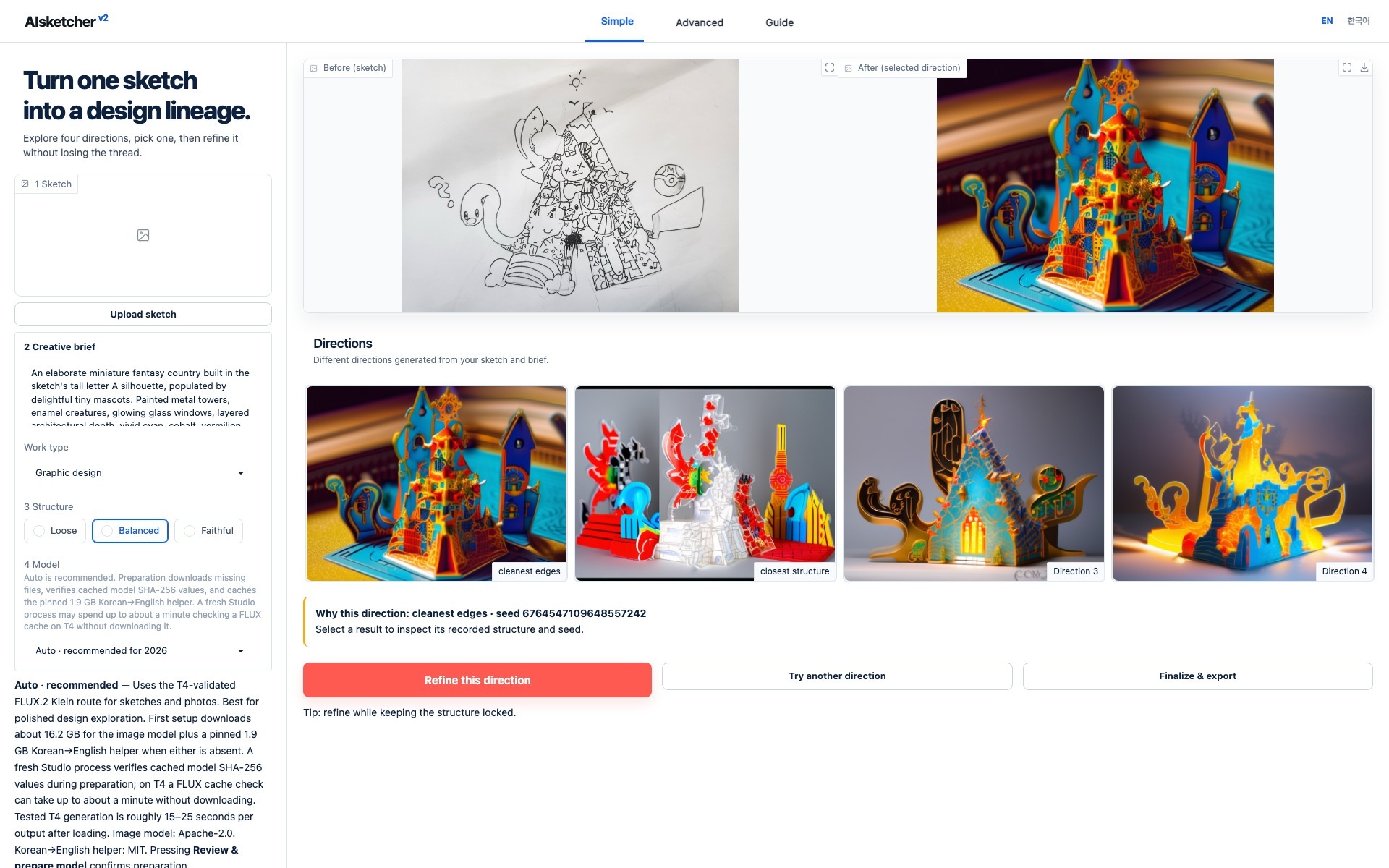
Actual local English Studio. Select the screenshot to open it full size.
For this capture, Studio opened its bundled, privacy-reviewed HPO hero Guided
Sample. The visible prompt, profile, and structure settings come from its
authenticated manifest, and the selected direction is fixed to seed
6764547109648557242 with pinned preset sdxl-canny-lite@1. Twelve new
candidates were reviewed in four bounded rounds before selection. The fixture
opens without model weights, network access, or an image upload. Pocket Kingdom
remains a separate documentation-only canonical lineage example.
This screenshot remains the canonical historical SDXL Canny sample. It is provenance evidence for that recorded recipe, not a claim that SDXL is a modern quality default. New live studies expose concrete roles: Fast Edit uses FLUX.2 Klein reference-image editing, while Structure Lock uses the legacy SDXL Canny path when exact lines matter more than current-generation quality.
Simple is the default
Simple asks for:
- a sketch;
- a one-sentence creative brief;
- a work profile;
- Loose, Balanced, or Faithful structure;
- a 1-, 4-, or 8-output budget.
It starts with one quick proof. Choose four directions for comparison or eight for a wider seed search. Candidate cards avoid an inner gallery scrollbar, preserve generation order, and let you enlarge any input or result. After picking a direction, choose Refine this direction, Try another direction, or Finalize & export.
Simple starts with the T4-validated flux2-klein-edit@1 Fast Edit preset.
FLUX.2 Klein uses the uploaded image as a reference for fast sketch
interpretation and semantic edits; it is not a ControlNet and does not
guarantee line locking. A compact model choice explains what each option is
best for and whether its pinned files are already cached. Project
configuration and Advanced controls remain available in the Advanced view, but
cannot silently change the Simple model or output choice.
Raw seeds, legacy Canny parameters, steps, and guidance are intentionally absent from the default view.
Advanced reveals the resolved controls
Advanced adds model/preset details, control status, steps, guidance, seed mode, output count, variation strength, a structure lock, manifest export, and replay. Canny controls apply to the legacy SDXL presets; FLUX.2 Klein reports reference-image control instead. Because FLUX.2 has no native numeric image-to-image strength, the three variation levels become deterministic edit instructions and the applied method is recorded; the structure lock is also stated explicitly in that edit prompt. Exact Canny thresholds remain available through the Python API rather than the MVP Studio.
Auto produces a deliberate scout set, Locked seed runs one recorded 63-bit starting value, and Custom seeds accepts one value per requested output. Locked mode sets the output count to one; use it for controlled comparisons, not for discovering four directions.
Returning to Simple does not discard those values, but Simple runs the output budget visible in its own rail instead of applying hidden Advanced values. If an Advanced override is active, Simple displays Advanced overrides active and offers one explicit reset action.
Prompts and refinement
The creative brief remains the user-authored source of truth. If Studio detects
Korean, it preserves that original and prepares a separate English
model-facing prompt with the pinned local translator. The original, prepared
prompt, translator ID and revision, and any later refinement instruction are
recorded separately. A deterministic glossary protects recognized
visual-design terminology before Korean→English translation. The translator is
never downloaded implicitly. English setup prepares only the image model.
Korean Studio shows the MIT-licensed facebook/m2m100_418M helper, its pinned
revision, and roughly 1.9 GB transfer alongside the selected image model's own
license. Review & prepare model confirms the displayed downloads; leaving
setup before pressing it performs no network access. If the translator runtime or weights
are not ready, generation stops before GPU work; Studio does not silently send
raw Korean text to an image model. Terminology protection improves consistency
for its bounded glossary but does not guarantee perfect translation.
Refine this direction opens a short additional-instruction field. Leave it blank for the documented balanced polish, or describe only the change you want. Refinement keeps the selected image, seed, parent manifest, and original brief rather than replacing them.
Guided Sample
Guided Sample teaches the entire interaction without model weights, a network, or a GPU. It activates only when the bundle contains a valid manifest and every referenced source and candidate. Inputs and prompts are locked to the fixture; changing either starts the local-model path instead of pretending the fixture was generated from new input.
The package includes the reviewed anonymous source, exact prepared
input and Canny control, four real locally generated candidates, selected
direction, and matching manifest. Guided Sample is available immediately after
installing the demo extra and always remains read-only. Selecting
Refine this direction does not raise an error: it opens a model-preparation
layer that explains the recommended model, first-download size, cache reuse,
the Korean helper when needed, and license confirmation. Keep exploring the
sample closes the layer without changing the fixture.
Progress and Stop
Model preparation and generation can take longer on the first run. Studio
labels elapsed time separately from an estimate; 42.3 / 107.6 s means
42.3 seconds elapsed against a 107.6-second estimate, not a hard timeout.
While model preparation or generation is queued or running, use Stop instead of refreshing the tab. Queued work is removed immediately. Active generation is cooperatively cancelled at a backend step/output boundary; preparation checks Stop between streamed SHA-256 chunks and curated download groups. Existing files from a stopped verification remain untrusted until a retry succeeds, while an incomplete fresh managed destination is cleaned. Korean-helper setup checks Stop between tokenizer and model loading and can reuse files for its pinned revision; it does not use the image-model marker format.
If the page reconnects to the same browser session, Studio restores the active or stopping job and its Stop control; a refresh by itself does not cancel GPU work. If the temporary Studio server has ended, a recovery layer explains that the old address may have expired and offers a deliberate reload of the latest address instead of presenting raw component errors.
Local-only safety defaults
- The server binds to
127.0.0.1and does not create a public share link. - The packaged Studio is a local, single-user tool rather than a multi-tenant service. A browser session owns its run state and workspace.
- GPU work is serialized process-wide. A duplicate generation from the same session is rejected until the current backend callback has fully stopped.
- Uploads are limited to 20 MB and 50 megapixels.
- Anonymous model installation and arbitrary model URL inputs are not exposed.
- Interface text can switch between English and Korean.
Add the local extra only when live generation is needed.
See Troubleshooting for missing extras, fixture integrity failures, device limits, upload limits, and replay drift.